Desktop app guide
Connection proxy — how it works in the AutobotSignal desktop app
A proxy is a relay server between this PC and your broker: broker connections travel to the proxy first, so the broker sees its address and location instead of yours. You need one when your region or internet provider blocks trading sites — and only then. If your broker already works from here, leave the proxy off; it is one more thing that can fail, and adds nothing.
Connection proxy in the desktop app
Real screenshots of the current release on a practice account.
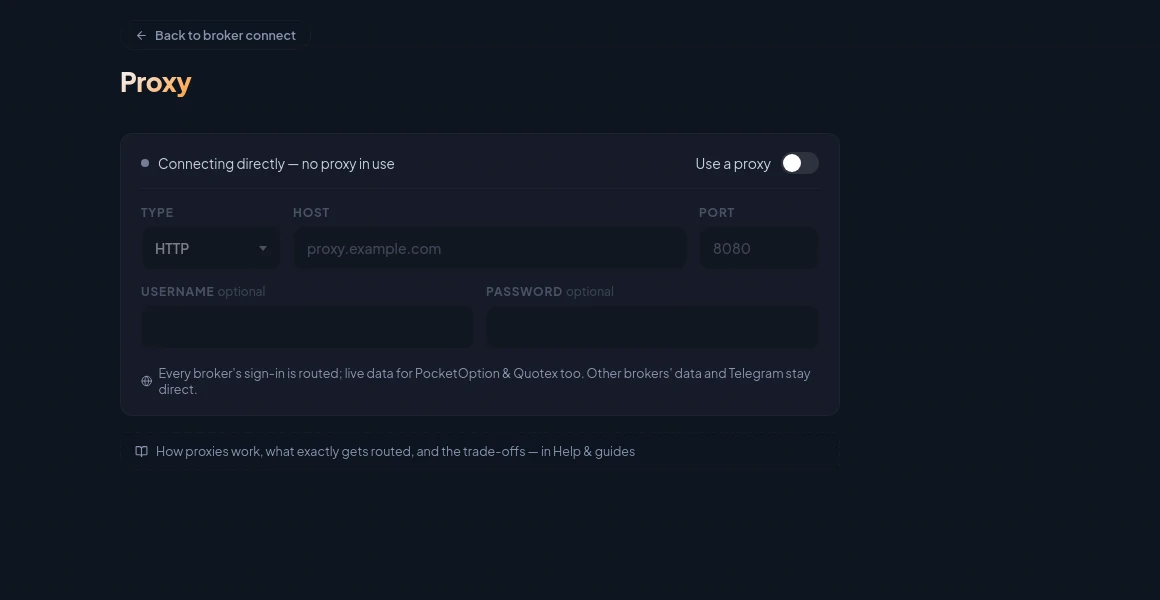
How Connection proxy works
- 1
Exactly what gets routed
Every broker's sign-in window goes through the proxy, and so do the live data connections for PocketOption and Quotex. Your AutoBotSignal account, incoming signals, remote control and app updates always connect directly and are never sent through it.
- 2
What is NOT routed
IQ Option, ExpertOption and OlympTrade sign in through the proxy, but their ongoing data connection stays direct — only PocketOption and Quotex route live data through it today. Deriv uses an API token with no browser sign-in, and its data feed is not routed either. Telegram is never routed. If a region blocks a broker so hard that even its data feed must be relayed, a system-wide VPN is the honest answer for now; this guide will say so when that changes.
- 3
Set it up
On the Proxy page, pick the type (HTTP, HTTPS, SOCKS5 or SOCKS4), enter the host and port from your provider, add the username and password if your proxy has them, and Save. New broker sign-ins and reconnects use it immediately; connections already open switch when they next reconnect. Turn off restores the direct connection.
Good to know
What the app does, and does not do, here
- It adds distance: every price and every trade travels further, so expect slower charts and slightly later entries than a direct connection.
- The proxy operator can see the traffic you send through it. Use a provider you pay and trust — never a free public proxy for anything that touches your money. (Measured while building this: of 68 free proxies from public lists, 2 answered at all.)
- Pick HTTP as the type if PocketOption won't connect: its data connection currently speaks HTTP proxies only, while the browser sign-ins handle SOCKS fine.
- Brokers recognise well-known proxy addresses. Their security checks may ask for extra verification at sign-in, or refuse the connection outright.
- Your connection now fails with the proxy's: if it goes down, broker connections go down with it until you fix it or turn it off.
- Password-protected proxies just work: enter the username and password here and every broker sign-in uses them automatically — the sign-in window never asks you for them.
- A proxy is not anonymity — you still trade as you, on your account, and your broker's own terms about proxy use still apply. Check them.
Start on a demo account. Automated trading can lose money and no win rate or profit is guaranteed — you are responsible for the rules you configure.
Run it on demo first
Install the desktop app, connect a practice account and see every rule on this page enforced before any real money is involved.